
Maps and timelines
Ask DuckyHelper when did the world wars happen? and you get a timeline you can scroll, with eras marked and a picture behind every event you tap. Ask show me Magellan's route and you get a world map you can pan, zoom and tap, with pins, highlighted countries and the route itself. Ask who was Ada Lovelace? and you get a card with real photos and sources.

When it happened, in order.
Ask when something happened, or how one event led to another. A scrollable timeline opens with its eras marked, so you see what came before and after. Tap any event and its picture opens. In Eddy, the timeline sits on the desk beside the lesson; on a Mac, it opens in the pill.
Ask why the colonies declared independence, and the events line up so the cause sits before the effect.
Quizzes can ask you to put events in order, and check you.
Where it happened, on a map you can move.
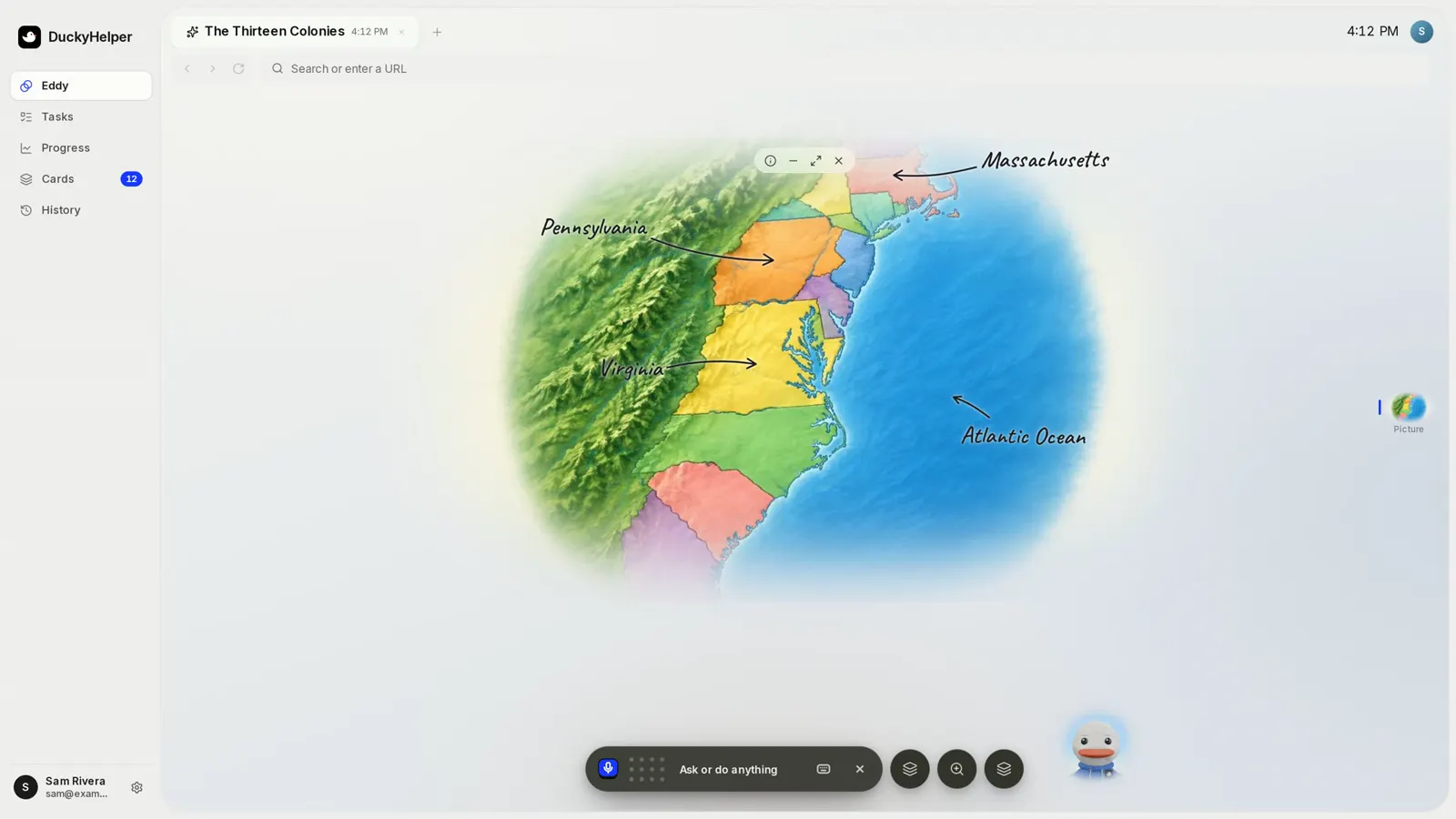
Ask show me Magellan's route, or where is the Fertile Crescent? A world map opens that you pan, zoom and tap, with pins on the places, countries highlighted and routes drawn. For a labelled picture of one region, like the Thirteen Colonies, Eddy draws the labels on as it names each place.
A card for every name and word.
In the Mac pill, ask who, what or what does it mean, and a card opens with real sources.

Knowledge cards
Who was Ada Lovelace? Real Wikipedia photos, a short summary, key facts and the sources.

Word cards
What does ubiquitous mean? A dictionary-style card.

Answers with sources
For anything current, a web search answer with its sources listed.
Ask when or where. Explore it.
How a history or geography question goes.
- 1. Ask when or where
When did it happen? Show me the route.
- 2. A timeline or a map opens
In the Eddy tab, or in the Mac pill.
- 3. Explore it
Scroll, pan, zoom, tap an event or a place.
- 4. Ask about what you found
Why there? What happened next?
See it where and when it happened.
Dates and places stick better when you can see them next to each other: what came first, how far apart. That is what a timeline and a map are for, and why Eddy reaches for them in history and geography. The learning science behind it: Draw it as you explain.
How to use it
Frequently asked questions
Is there an interactive timeline for history homework?
Yes. Ask DuckyHelper when something happened, or how one event led to another, and a scrollable timeline opens with its eras marked. Tap any event to see its picture. It works in the Eddy tab and in the Mac pill.
Can it show me a route on a map?
Yes. Ask show me Magellan's route, or the Silk Road, and a world map opens with the route drawn and pins on the places. You can pan, zoom and tap the map, and countries can be highlighted.
Where do the pictures and facts come from?
Knowledge cards use real photos and text from Wikipedia and list their sources. Events on a timeline open with their picture. Eddy's own labelled pictures say what they are in their (i), with the source credit.
Does it work on a school Chromebook?
Not right now: DuckyHelper is a Mac app (macOS 14 or later, Apple silicon). There is no Chromebook or web version. On a Mac, maps and timelines open on Eddy's desk in the Eddy tab, and knowledge cards and word cards in the pill.
More features

Ask when, or where
Open the Eddy tab, or press fn on your Mac, and ask when it happened.


