
Study for finals, one day at a time.
To study for finals, spread your review over the days you have, test yourself instead of rereading, and spend the time on what you miss. DuckyHelper does each part with you. Ask Eddy to plan drafts study sessions around your week in Tasks. A quiz shows what you know in each class. The questions you miss come back as flashcards right before you would forget them.
“Chem final Monday, history Wednesday, soccer Tuesday and Thursday. Plan my week.”
One sentence is enough to start. Type it like that in Tasks, or say it to Eddy. You get study sessions drafted around your week, and nothing is added until you accept it.

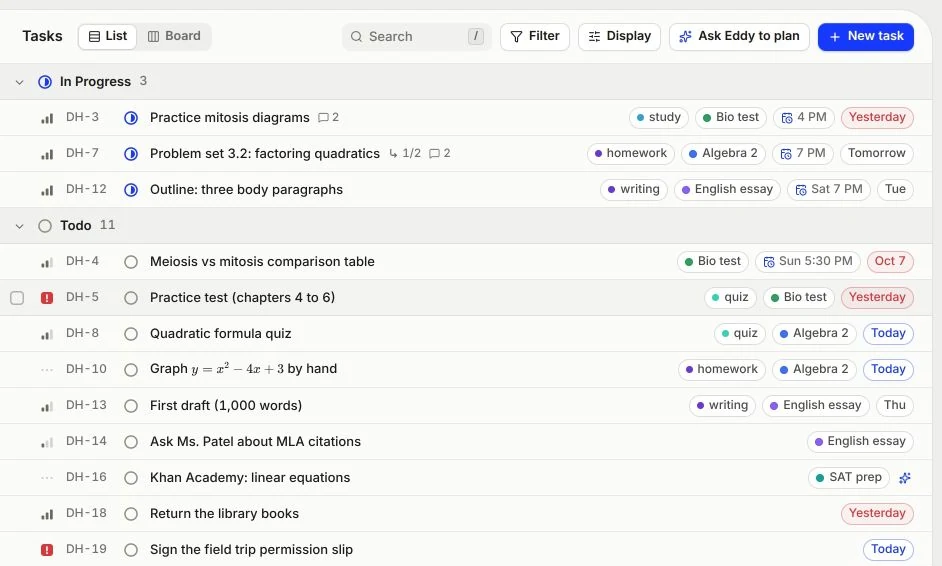
Plan the week before it starts.
Open Tasks and press Ask Eddy to plan. Tell it when your exams are and what else fills your week. It drafts study sessions as rows you can see, all ticked: untick the ones that don't fit, add the rest, or throw the draft away.
Give each class a project, add due dates and labels, and switch between a list and a board. Tasks shows what is late, what is due today and what comes next.
Ask Eddy “what should I do now?” It reads today's tasks, offers to start the next one with you, and when you finish it logs a note and the minutes on that task.
Add homework from a file opens a worksheet, or a photo of one, in Eddy, so you can start on it right away.
Changes show at once on every Mac you are signed in on. In the pill the button says Ask Ducky to plan.
Test yourself. Don't reread.
Rereading feels like studying, but a quiz shows what you can actually recall. Say “quiz me on chapter 6” and you get a short quiz on it: multiple choice, true or false, typed math, fill in the blanks, steps in order, matching pairs. Miss one and it tells you why.
Press fn and say quiz me. The quiz opens in the pill: tap a choice or press 1 to 4, type math and see what it reads as, then check. You get a score at the end.
Ask Eddy to quiz you. The quiz docks as a Quick check beside the picture, and Eddy's pointer shows the part each question is about.
Press Hint. The ladder opens one rung at a time: a nudge, a bigger hint, the worked step, and the answer last.
In one study, students who took a recall test on a passage remembered more of it a week later than students who read it again (Roediger and Karpicke 2006).
What you miss comes back.
Every question you get wrong can become a flashcard. Cards come back on a spaced schedule, right before you would forget them, so the week before the exam you review what you are about to lose instead of what you already know.
Review opens in the pill: space flips the card, then rate it Again, Hard, Good or Easy. Each rating shows when the card comes back.
Ask Eddy to go over your due cards with you. Flashcards dock beside the picture, and you flip and mark them.
Cards shows what is due now, what comes back in the next 14 days, and each deck by topic with how well you know it.
A review of 317 experiments found that study spread over time beats the same study crammed into one session, and that the longer you need to remember, the longer the gaps should be (Cepeda and others 2006).
Reread, or test yourself?
A short film on why testing beats rereading, from Ebbinghaus in 1885 to Roediger and Karpicke in 2006, then a quiz in the Mac app and the missed card coming back. Music only.
Five ways to use it in finals week
What a week of studying looks like with DuckyHelper, from the plan to the night before.
- 1. Plan the days you have
Ask Eddy to plan with your exam dates. Accept the sessions that fit, and you know what each day is for.
- 2. Quiz one class at a time
Start each session with a short quiz on one topic. What you miss shows where the time should go.
- 3. Work through what you missed
Ask Eddy to explain it on the blackboard. It writes and draws step by step as it talks, then hands you one to try.
- 4. Review your cards every day
A few minutes a day keeps them from piling up. Cards shows what is due today.
- 5. Open your study guide
Open your review sheet, notes or slides as a file. Eddy reads the questions with you and gives hints before answers.
Working out what you need on the final? Try the final grade calculator, and time your sessions with the study timer.
Your study stays yours.
Memory, lesson replays and hands-free listening each have a switch in Settings, and you can export or delete your data at any time. We don't sell it, and neither we nor OpenAI use it to train AI models.

How to use it
Frequently asked questions
How should I study for finals?
Start as early as you can. List each exam, split the material into short sessions across the days you have, and begin each session by testing yourself instead of rereading. Spend most of the time on what you missed, and review a little every day. In a large review of study methods, practice testing and spreading study out were rated the two most useful (Dunlosky and others 2013).
Can DuckyHelper make me a finals study plan?
Yes. In Tasks, press Ask Eddy to plan and type your exams and your week, for example “chem final Monday, soccer Tuesday and Thursday, plan my week.” It drafts study sessions as rows you can untick or keep, and nothing is added until you accept. The Free plan includes a few plans a day.
Does it work on a school Chromebook?
Not right now: DuckyHelper is a Mac app (macOS 14 or later, Apple silicon). There is no Chromebook or web version. On a Mac, Tasks, quizzes, flashcards and Eddy are all in the app, and Ducky points and draws over your own work.
My final is tomorrow. Is it too late?
No, but skip the plan. Ask for a short quiz on the topics you are least sure of, work through every miss with Eddy until you can do one like it yourself, and keep the misses as flashcards for one more pass in the morning.
Can I use DuckyHelper during the exam?
No. DuckyHelper is for studying and practice. Don't use it during a test unless your teacher allows it. Our AI use and academic integrity guide explains how it is meant to be used.
What does it cost?
There is a Free plan to start with, and paid plans add more talking time and more of each tool. Pricing shows the current plans and what each one includes.
Sources
- Roediger, H. L., and Karpicke, J. D. (2006). Test-enhanced learning: taking memory tests improves long-term retention. Psychological Science. (accessed 2026-10-09)
- Cepeda, N. J., and others (2006). Distributed practice in verbal recall tasks: a review and quantitative synthesis. Psychological Bulletin. (accessed 2026-10-09)
- Dunlosky, J., Rawson, K. A., Marsh, E. J., Nathan, M. J., and Willingham, D. T. (2013). Improving students' learning with effective learning techniques. Psychological Science in the Public Interest. (accessed 2026-10-09)
More for you

Start on finals today
Plan the week, quiz one class, and keep what you miss. DuckyHelper works on your Mac.


